Claim Rejection Notifications
What rejections are from your 277CA?
Review the various errors below to understand how to correct and resubmit.
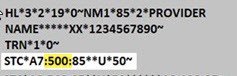
When viewing your 277CA, all HAP CareSource™ MI Health Link (Medicare-Medicaid Plan) rejections will have a Claim Status Category Code of A7. The second code is the Claim Status Code. This is the Error Number from the list below. You can find this after the A7 in the STC segment of your 277CA.
Error Number: 21
Error Description: Invalid birth weight
How to Fix: Enter a numeric birth weight.
Error Number: 21
Error Description: Newborn Delivery Claims without gestation age
How to Fix: On professional claims, the CPT procedure codes must be tied to the appropriate ICD-10 diagnosis codes. Diagnosis code validation edits on professional claims are based on detail-level diagnosis pointers, and the 5010 X12 837P standard only allows up to four diagnoses to be pointed per detail. If the weeks of gestation code is missing or not pointed to on one of the four diagnosis pointer fields in the delivery detail of the claim, the delivery detail will be denied.
Error Number: 33
Error Description: Member not found for submitted member ID or Claim received for group not valid to process claims
How to Fix: The system will check the member ID, sex, DOB, and first 4 characters of the last name to attempt to identify the correct member. Contact Provider Services at 1-833-230-2159 to resolve this issue.
Error Number: 115
Error Description: Claim submitted to incorrect payer
How to Fix: HAP CareSource began processing Michigan Medicaid claims (MIMCDCS1) on October 1, 2023, and Michigan Medicaid-Medicare Plan claims (MIMCRCS1) on January 1, 2024. Claims submitted to HAP CareSource for dates of service prior to these dates will be rejected with this message. Claims with dates of service prior to these dates should be billed to the Health Alliance Plan (HAP) payer ID 38224.
Vision and dental claims billed directly to HAP CareSource will be rejected with this code. Vision claims for both HAP lines of business should be billed to Versant. Dental claims should be billed directly to Delta Dental.
If you need further help, contract Provider Services at 1-833-230-2159.
Error Number: 128
Error Description: Submitted Provider Tax ID not in Facets
How to Fix: The provider is not set up with HAP CareSource MI Health Link to send electronic claims. The provider needs to submit a W-9 form to HAP CareSource MI Health Link prior to sending electronic claims. Please contact Provider Services at 1-833-230-2159.
Error Number: 132
Error Description: Missing/Invalid Medicaid ID for Atypical Provider
How to Fix: Ensure correct Medicaid ID is provided.
Error Number: 187
Error Description: Date of Service (DOS) after received date
How to Fix: DOS must be prior to Received Date.
Error Number: 188
Error Description: The claim statement date cannot be after the claim received date.
How to Fix: Make sure that the statement date on the claim is not in the future.
Error Number: 255
Error Description: Rejection for Newborn Delivery Claims without gestation age
How to Fix: Include Newborn Gestation age.
Error Number: 453
Error Description: Procedure code/mod combo not valid
How to Fix: Resubmit with a valid Procedure Code and/or Modifier.
Error Number: 488
Error Description: Invalid Diagnosis code
How to Fix: Enter valid Diagnosis Code(s) for services rendered.
Error Number: 508
Error Description: ICD-09 Code Found After ICD-10 Implementation Date
How to Fix: Remit current ICD-10 code.
Error Number: 538
Error Description: Corrected claim, with no original claim ID
How to Fix: If you are sending a corrected claim with frequency of 7, you must include the last adjudicated Claim ID in the REF*F8 segment.
If the last adjudicated claim ID is unknown, contact Provider Services at 1-833-230-2159.
Error Number: 562
Error Description: This error means one or more providers are not active on the Provider Master File (PMF) or in the Michigan CHAMPS file. All providers on the claim need to be registered in CHAMPS. Billing, rendering, attending, operating, supervising, referring or service facility provider must all be registered and active.
How to Fix: Check status or enroll in Michigan CHAMPS.
Claims submitted with a DOS of March 25, 2021 going forward will deny/reject if the rendering provider was not actively affiliated with the billing group on the PMF during the DOS. You can validate your information in the MITS system.
Error Number: 700
Error Description: Claim is being rejected because it had an ICD-10 CPT code before ICD-10 was implemented in 2015. Majority of the time, the date is a typo or the code is not a valid ICD-10 code.
How to Fix: Correct DOS with date after ICD-10 was available.
Error Number: 773
Error Description: Claim is rejected for service line date spans more than a calendar year
How to Fix: Make sure all service lines are in the same calendar year.